
Smart charging & load balancing
Every amp accounted for. Never one over the limit.
One connection, many cars. ChargeIT shares the site’s power between every charger in real time, so you install more chargers without paying for a bigger connection, and the breaker never trips.
- Building 34 A
- Charging 45 A
- Headroom 1 A
The rules it never breaks
Four rules, every tick.
The balancer is built around one non-negotiable: the site never goes over its connection, not even for seconds. Utilisation comes second, and it is still pushed as high as it safely goes.
seconds over the limit
The breaker is the limit. Every allocation is checked against it before it is sent.
Cuts before raises
Power is taken back from chargers first, then given out, so a change never adds up to more than the site has.
Admission at 0 A
A new car waits at 0 A until there is room for it to charge properly, instead of squeezing everyone below the minimum.
Fails safe
No meter reading for 30 seconds and the balancer drops to its safety plan.
The live view
It shows its reasoning.
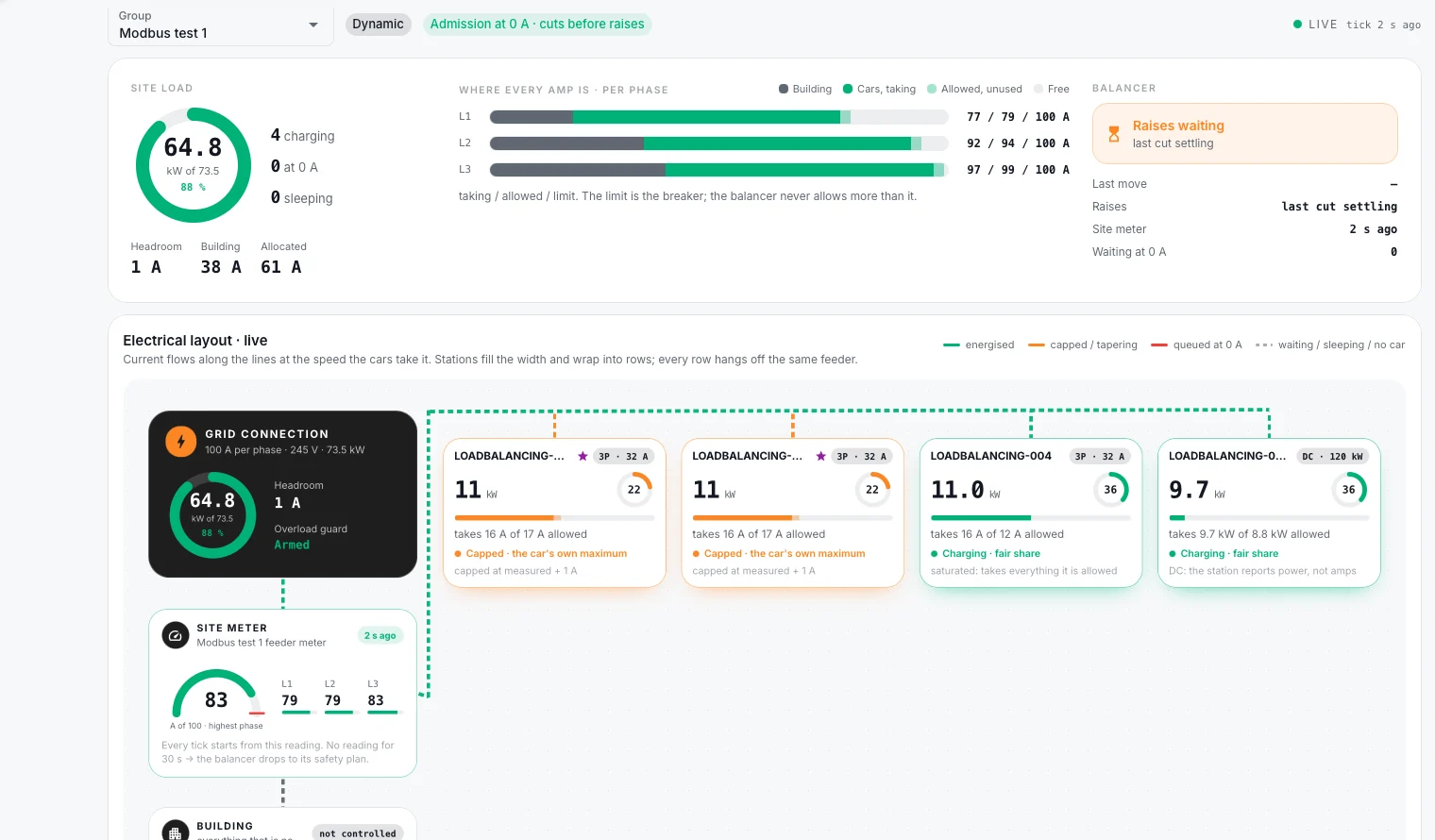
The electrical layout draws the site as it is wired: grid connection, site meter, building and every charger, with current flowing along the lines in real time.
- Where every amp is, per phaseBuilding, cars charging, allowed but unused, and free, for L1, L2 and L3.
- Why each car gets what it getsCapped at the car’s own maximum, charging at a fair share, or queued at 0 A.
- AC and DC on one siteAC chargers are balanced in amps, DC chargers by the power they report.
- Energised
- Capped
- Queued at 0 A
How it works
From the meter to the charger.
The balancing runs in the ChargeIT cloud and talks to chargers over standard OCPP smart charging, so there is nothing proprietary to install in the charger.
An edge gateway reads the site meter
Over Modbus, and pushes the readings to ChargeIT.
ChargeIT works out the headroom
Connection limit minus what the building uses, per phase.
It shares the headroom fairly
Each car up to its own maximum, the rest shared between the others.
Chargers get their new limits
Through OCPP charging profiles, cuts first, raises after.
Two modes
With a site meter, or without one.
Follows the building live
The site meter shows what the building is using right now, and the chargers get everything that’s left. Best where the building load changes during the day.
A fixed limit, no meter
The chargers share a fixed limit you set. Best for dedicated charging connections, or as a start before a meter is fitted.
Register maps checked against each meter’s documentation.
- Eastron SDM630
- Eastron SDM230
- Eastron SDM120
- Eastron SDM72D-M
- Carlo Gavazzi EM340
- Carlo Gavazzi EM24
Questions
Load balancing, answered.
What happens if the site meter stops reporting?
If no reading arrives for 30 seconds, the balancer drops to its safety plan instead of guessing: depending on how the site is set up, chargers fall back to a safe floor or pause until readings return.
Do I need a site meter?
No. Static mode balances the chargers against a fixed limit you set. Add a meter later to switch to dynamic mode and use the power the building isn’t using.
Does it work with any charger?
It works with chargers that support OCPP smart charging. The balancer sends standard charging profiles, so nothing proprietary has to run in the charger.
Is it per phase?
Yes. The live view shows every phase separately, and the limit is respected on each one.
What about DC chargers on the same site?
They are balanced together with AC chargers. DC stations report power rather than amps, and the balancer works with what they report.
More chargers. Same connection.
Send us your site’s connection and charger list and we’ll show you how it would be balanced.
Book a demo